
What is the best small business phone system?
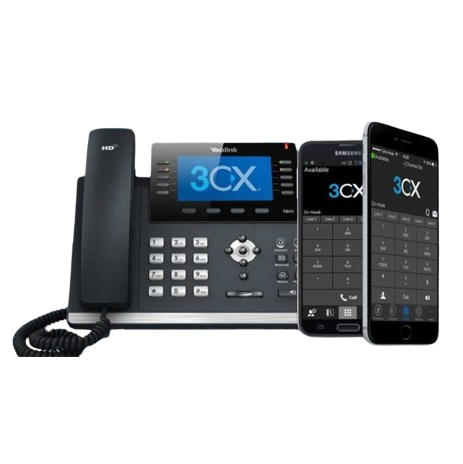
For many small businesses, the best phone system is a hosted VoIP or 3CX phone system that lets staff answer calls from desk phones, mobiles or computers. It should include call routing, voicemail to email, auto attendant greetings, call transfers, after-hours routing and easy support as the business grows.
Choosing the best office phones for a small business can make everyday communication easier, clearer, and more professional. Whether you are answering customer enquiries, managing staff calls, working remotely, or planning for growth, the right phone system can help your business stay connected.
At Smart Phone Systems, we help Australian small businesses choose hosted phone systems, desk phones, mobile apps, voicemail, call routing, and other features that support professional communication without unnecessary complexity.
A small business phone system should be reliable, flexible, easy to use, and cost-effective. It should also be able to grow with your team as your needs change.
Learn more about our hosted phone systems here:
Hosted Phone Systems
Why Small Businesses Need the Right Office Phones
Small businesses rely on good communication. Every phone call could be a new enquiry, a support request, a booking, or an opportunity to build trust with a customer.
When calls go unanswered, get handled poorly or reach the wrong person, customers grow frustrated and look elsewhere. However, with the right office phone setup, your team can answer calls professionally and manage enquiries more efficiently.
The best office phones for a small business can help you:
- answer calls more professionally;
- reduce missed calls;
- transfer calls between staff;
- use voicemail and missed call alerts;
- support remote and hybrid workers;
- keep personal mobile numbers private;
- improve customer service;
- add users as your business grows.
For many small businesses, a hosted phone system gives the right balance of flexibility, features, and affordability.
What Makes a Good Small Business Phone System?
A good small business phone system should match how your team actually works.
Some businesses need desk phones for every staff member. Others may prefer a mix of desk phones, mobile apps, computer softphones, and voicemail to email. In many cases, the best setup is not one single device, but a combination of tools that suit different users.
A good system should be:
- simple to use;
- reliable for everyday calls;
- flexible enough for remote work;
- scalable as the team grows;
- professional for customers;
- cost-effective for the business;
- easy to manage and support.
Smart Phone Systems can help design a setup that suits your business, rather than forcing every user into the same phone arrangement.
Office Phones, Mobile Apps and Softphones
Modern small business phone systems are not limited to traditional desk phones.
Your team may be able to use several types of calling tools, including:
- desk phones;
- mobile apps;
- computer softphones;
- browser-based calling;
- cordless or Wi-Fi handsets;
- conference phones.
This flexibility means staff can communicate from the office, from home, or while travelling.
For example, an office administrator may prefer a desk phone, while a remote worker may use a softphone on their computer. A business owner may use a mobile app to answer calls while away from the office.
Related articles:
What Should a Small Business Phone System Include?
A small business phone system should be simple to use, reliable and flexible enough to support the way your team works. For some businesses, that means desk phones in the office. For others, it may mean mobile apps, softphones, voicemail to email, call routing and after-hours call handling.
The best setup is often a mix of tools. A receptionist or office administrator may prefer a desk phone, while a business owner or mobile staff member may benefit from answering calls through a mobile app. Remote workers may prefer a softphone on their computer, and busy teams may need voicemail to email or missed call alerts to make sure enquiries are followed up quickly.
When choosing a small business phone system, it is worth considering:
- how many people need to answer calls
- whether staff work from the office, home or on the road
- whether calls need to route to different people or teams
- what should happen after hours
- whether voicemail should be sent to email
- whether missed calls need automatic alerts
- whether the system can grow as the business adds staff.
Smart Phone Systems can help design a hosted phone system that suits your current team while giving you room to grow.
Popular Features for Small Business Phone Systems
Small businesses often benefit from features that make call handling easier and more professional. These may include call routing, voicemail to email, lost call alerts, messages on hold, mobile app access and after-hours call management.
Useful features include:
- Voicemail to email, so messages can be sent directly to your inbox for faster follow-up.
- Lost call alert emails, so missed enquiries are easier to identify and return.
- After-hours phone management, so callers receive clear instructions when the office is closed.
- Virtual phone app access, so staff can make and receive business calls from supported mobile devices.
- Softphones for PC, so users can manage calls from their computer.
- Messages on hold, so callers hear useful information while waiting.
These features can help small businesses sound more professional, reduce missed opportunities and support staff working from different locations.
Key Features to Look For
When choosing the best office phones for a small business, it is worth looking beyond the handset itself. The features behind the phone system are just as important.
Useful small business phone features include:
- call forwarding;
- voicemail;
- voicemail to email;
- missed call alerts;
- call transfer;
- ring groups;
- after-hours routing;
- mobile app access;
- desktop calling;
- conference calling;
- call queues;
- business greetings;
- extensions;
- speed dial or BLF keys.
These features help your team handle calls more professionally and reduce the risk of missed enquiries.
Explore more features here:
Business Phone System Features
Keep Your Business Calls Professional
Many small businesses start by using personal mobile phones for business calls. That may work at first, but it can become difficult as the business grows.
A dedicated business phone system helps keep calls more professional and easier to manage.
Instead of customers calling one person’s personal mobile, your business number routes calls to the right person or team. This helps keep communication inside the business and gives customers a more consistent experience.
A business phone system can help you:
- use a professional business number;
- keep personal numbers private;
- route calls to the right person;
- manage calls after hours;
- send voicemail to email;
- add staff without changing the whole setup.
If you are still relying on personal mobiles, this is often a sign that your business is ready for a more structured phone system.
Reduce Missed Calls and Lost Opportunities
Missed calls can be costly for small businesses.
A customer might want a quote, a booking, an answer to a question or a follow-up on an enquiry. If no one answers and there is no clear follow-up process, that opportunity may be lost.
A hosted phone system can help reduce missed calls with features such as:
- ring groups;
- call forwarding;
- voicemail to email;
- lost call alert emails;
- after-hours messages;
- call routing;
- mobile app access.
For example, if a call is missed, your team may receive an email alert or voicemail notification so someone can follow up quickly.
Useful related pages:
Choose Phones That Can Grow With Your Business
Your small business phone system should not hold you back as your team expands.
As your business grows, you may need to add more users, new locations, remote staff, or different call routing options. A hosted phone system can make this easier by allowing your communication setup to adapt over time.
A scalable phone system can help you:
- add new staff extensions;
- support remote workers;
- connect multiple locations;
- create ring groups;
- set up department routing;
- add voicemail and call handling features;
- adjust your setup as your business changes.
This means you do not need to start again every time your business grows.
Read more here:
Planning Business Growth With VoIP
Understanding Small Business Phone System Cost
Small business phone system cost can vary depending on what your business needs.
The total cost may depend on:
- the number of users;
- the type of handsets required;
- whether staff need mobile or desktop access;
- call routing requirements;
- number porting;
- setup and configuration;
- voicemail and after-hours requirements;
- ongoing support.
At Smart Phone Systems, we aim to provide practical, cost-effective phone solutions that suit small business needs. Instead of paying for features you do not need, your business can choose a setup that matches your team, budget, and communication requirements.
For more information, visit:
Hosted Phone System Pricing
Choosing the Right Handsets
The best office phones for a small business will depend on the user’s role.
For example, a general office user may need a simple and reliable desk phone. A receptionist or busy call handler may benefit from a larger screen or more call handling buttons. A meeting room may need a conference phone, while mobile staff may need a cordless or app-based option.
Different users may need different devices, such as:
- everyday desk phones;
- premium desk phones;
- cordless or Wi-Fi handsets;
- conference phones;
- computer softphones;
- mobile apps;
- headsets.
We can help match the right device to each role.
Useful article:
Choosing the Right Yealink Business Phones
Support Remote and Hybrid Work
Small business teams are often flexible. Some staff may work from home, some may work from the office, and others may be on the road.
A hosted phone system can support this by allowing staff to make and receive business calls from different devices and locations.
This helps remote and hybrid teams:
- stay connected;
- answer business calls away from the office;
- use business numbers instead of personal mobiles;
- transfer calls to colleagues;
- access voicemail remotely;
- maintain a professional caller experience.
For modern small businesses, this flexibility can be just as important as the desk phone itself.
Get Help Choosing the Best Office Phones for Your Small Business
Choosing a phone system can feel confusing, especially when there are so many options. Desk phones, mobile apps, softphones, voicemail, call routing, and pricing all need to work together.
Our team can help you choose the right setup for your business.
We can assist with:
- hosted phone system setup;
- choosing office phones;
- configuring users and extensions;
- number porting;
- call flow design;
- voicemail to email;
- after-hours call handling;
- mobile app access;
- ongoing support.
Learn more about the setup process here:
Hosted Phone System Setup
Learn more about our pricing here:
Hosted Phone System Pricing
Or contact us here:
Contact Smart Phone Systems
Conclusion
We work with small businesses across many industries including trade businesses, retail businesses, hospitality businesses, accounting firms and automotive workshops. Visit our industries page to find your sector and see how we can help.
For a practical overview of VoIP options for small businesses, read our guide to VoIP phone systems for small business in Australia
The best office phones for a small business are the ones that make communication easier, more professional, and more reliable.
A hosted phone system can help your business answer calls, reduce missed enquiries, support remote workers, add users as you grow, and keep communication organised.
With Smart Phone Systems, your small business can choose a phone setup that suits your team today and can adapt as your needs change.
FAQ's
In many cases, yes. Smart Phone Systems can help with number porting so your business can keep using familiar contact numbers while moving to a hosted phone system.
Not always. Some users may prefer desk phones, while others may use mobile apps or softphones from a computer. The best setup depends on each person’s role.
Yes. A hosted phone system can support remote and mobile users, helping staff make and receive business calls from different locations.
Features such as voicemail to email and lost call alert emails can help your team identify missed calls and follow up quickly.
Yes. A hosted phone system can be adjusted as your business grows, including adding users, extensions, call routing options and additional features.


